
144 lines
7.3 KiB
Markdown
144 lines
7.3 KiB
Markdown
<div align="center">
|
||
<p align="center">
|
||
<a href="#">
|
||
<img src="https://i0.wp.com/www.networkcorp.fr/wp-content/uploads/2018/03/dhcp_logo.jpg?resize=699%2C231" height="200px" />
|
||
</a>
|
||
</p>
|
||
</div>
|
||
|
||
<div style="border: 2px solid #d1d5db; padding: 20px; border-radius: 8px; background-color: #f9fafb;">
|
||
<h1 align="center">Serveur DHCP Windows Server</h1>
|
||
</div>
|
||
|
||
---
|
||
# Table des matières
|
||
- [Installation pilote](#installation-pilote)
|
||
- [Création de ports](#création-de-ports)
|
||
- [Création d’imprimantes](#création-dimprimantes)
|
||
- [Création de pool d’impression](#création-de-pool-dimpression)
|
||
---
|
||
# Prérequis
|
||
- le serveur doit appartenir au réseau ou domaine qui doit être géré
|
||
|
||
# Installation du rôle DHCP
|
||
## Via interface graphique
|
||
## Via Powershell
|
||
# Gestion DHCP
|
||
## Via Interface Graphique
|
||
- Création d’étendue d’adresse IP
|
||
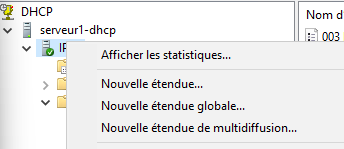
- dans la console DHCP, cliquer droit sur le serveur et choisir nouvelle étendue
|
||
|
||
|
||
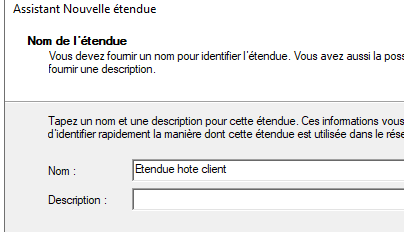
- saisir le nom de l’étendue (utiliser une charte pour assurer la comprehension par tous le monde)
|
||
|
||
|
||
|
||
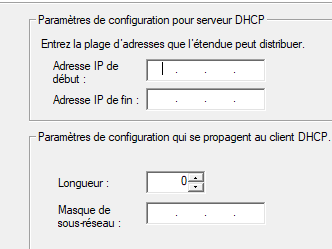
- Saisir les adresses ip de début et de fin de l’étendue avec le masque de sous-réseau
|
||
|
||
|
||
|
||
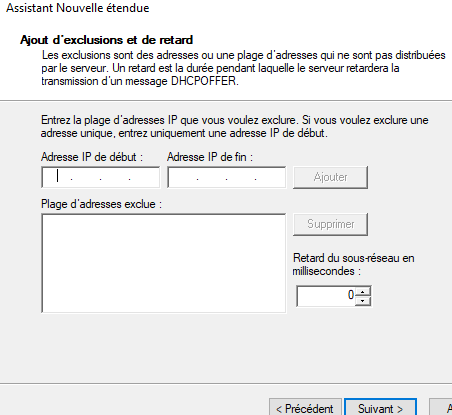
- ajouter des adresses ou étendues d’addresse à exclure de l’étendue, puis validez
|
||
|
||
|
||
|
||
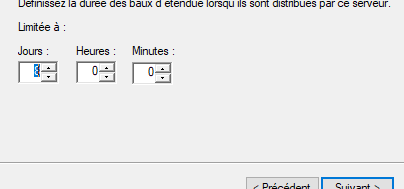
- régler la durée du bail, puis validez
|
||
|
||
|
||
|
||
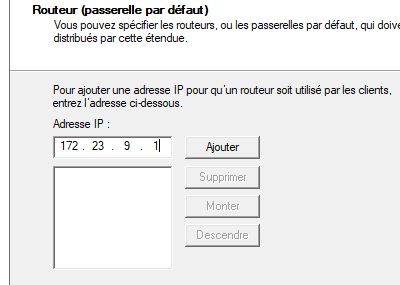
- configurer les option en ajoutant une passerelle ⇒ activation du routage
|
||
|
||
|
||
|
||
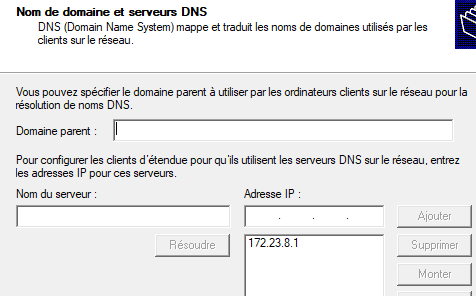
- configurer un DNS
|
||
|
||
|
||
|
||
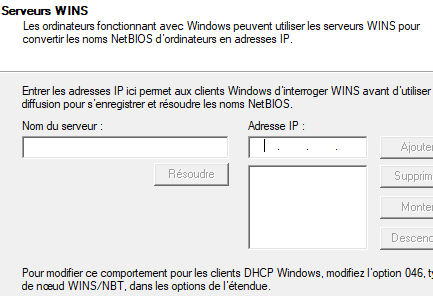
- configurer un serveur WINS
|
||
|
||
|
||
|
||
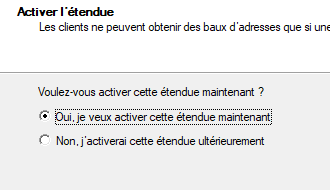
- activer l’étendue et validez
|
||
|
||
|
||
|
||
- Création de réservations d’adresse IP
|
||
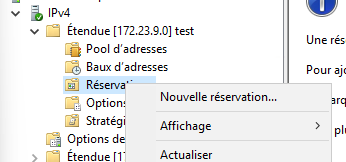
- clique droit sur réservation, puis nouvelle réservation:
|
||
|
||
|
||
|
||
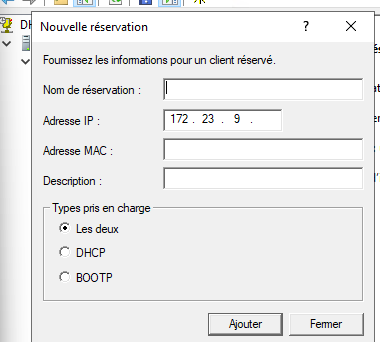
- saisir un nom pour la réservation, l’adresse IP que l’on veut réserver, l’adresse MAC de l’appareil qu’on veut associer, puis ajouter
|
||
|
||
|
||
|
||
- Création de restriction d’étendue
|
||
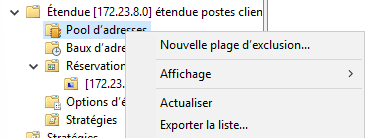
- dans l’étendue d’adresse du DHCP, clique droit sur le pool d’adresses, choisir nouvelle restriction
|
||
|
||
|
||
|
||
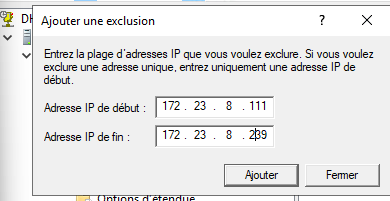
- saisir l’étendue à exclure, puis valider
|
||
|
||
|
||
|
||
- Cas de 2 serveurs DHCP sur 2 réseaux différents
|
||
1. Sur le DHCP du réseau 1, créer une nouvelle étendue sur le 2eme réseau avec les adresses ip disponibles sur l’étendue du DHCP du 2eme réseau
|
||
2. Faire de même sur le DHCP du réseau 2, avec les adresses ip disponibles sur l’étendue du DHCP du 1er réseau
|
||
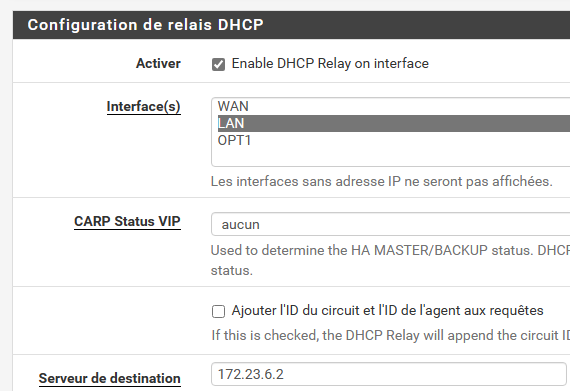
3. Activer sur le routeur du réseau 1 le relai DHCP avec le serveur DHCP du réseau 2
|
||
|
||
|
||
- activer sur le routeur du réseau 2 le relai DHCP avec le serveur DHCP du réseau 1
|
||
## Via Powershell
|
||
- Installation du Rôle
|
||
|
||
```powershell
|
||
Install-WindowsFeature DHCP -IncludeManagementTools
|
||
```
|
||
- Dans le cadre d’un domaine géré par active directory (et si le server dhcp n’est pas sur le serveur active directory), il faut ajouter le serveur dhcp au contrôleur de domaine.
|
||
```powershell
|
||
Add-DHCPServerInDC -DNSName "serveur AD"
|
||
```
|
||
- Ajout de l’option DNS et Routeur sur le serveur dhcp:
|
||
```powershell
|
||
Set-DhcpServer"type d'IP"OptionValue -DNSServer "ip dns" -DNSDomain "nom domain" -Routeur"passerelle par defaut"
|
||
```
|
||
- exemple:
|
||
```powershell
|
||
Set-DhcpServerv4OptionValue -DNSServer 192.168.100.10 -DNSDomain lab.lan -Router 192.168.100.2
|
||
```
|
||
- Configuration d'un scope DHCP (une étendue dhcp)
|
||
- **Nom étendue**
|
||
- **Description** : Plage DHCP des ordinateurs du domaine
|
||
- **Plage IP** : ip début étendue à ip fin étendue
|
||
- **Passerelle par défaut**
|
||
- **Serveur DNS**
|
||
```powershell
|
||
Add-DhcpServer"type d'IP"Scope -Name "nom étendue" -StartRange "ip début étendue" -EndRange "ip fin étendue" -SubnetMask "mask sous réseau" -Description "champs description de l'étendue"
|
||
```
|
||
- exemple:
|
||
```powershell
|
||
Add-DhcpServerv4Scope -Name "LAB-PC" -StartRange 192.168.100.100 -EndRange 192.168.100.200 -SubnetMask 255.255.255.0 -Description "Plage DHCP des ordinateurs du domaine LAB"
|
||
```
|
||
- Ajout d’option sur l’étendue dhcp
|
||
```powershell
|
||
Set-DhcpServer"type d'IP"Scope -ScopeId "Id étendue" -OptionId "identifiant option" -Value "valeur de l'option"
|
||
```
|
||
- exemple:
|
||
```powershell
|
||
Set-DhcpServerv4Scope -ScopeId 192.168.0.0 -OptionId 3 -Value 192.168.255.254 => option 3: routeur, value: adresse ip du routeur
|
||
```
|
||
- liste des étendues
|
||
```powershell
|
||
Get-DhcpServer"type d'IP"Scope
|
||
```
|
||
- exemple:
|
||
```powershell
|
||
Get-DhcpServerv4Scope
|
||
```
|
||
- liste des options
|
||
```powershell
|
||
Get-DhcpServer"type d'IP"OptionDefinition |Select-Object -Property Name,OptionId
|
||
```
|
||
- exemple:
|
||
```powershell
|
||
Get-DhcpServerv4OptionDefinition |Select-Object -Property Name,OptionId
|
||
```
|
||
|